
How To: Vehicle Selector
The vehicle selector helps you quickly and easily find products compatible with any selected motorcycle, scooter or ATV.
There's two methods of finding your vehicle, either through simply selecting models from our lists, or typing your into the vehicle selector search.
Find your preferred method below!


HANDY TIP #1
Each of our product pages also contain compatible vehicle information.
In the DESCRIPTION you will find a summary of the compatible Manufacturer and Models.
In the FITMENTS tab on a product page you will find our full list of available compatible models, and where available this will include a fitment note. For example, if you are looking at an oil product it will include that vehicles oil capacity, or tyre pressures if looking at a tyre.
You can use the search on the FITMENTS tab list to narrow down to the vehicle you're looking for.
Selecting From A List (Dropdown)
The most common vehicle selector method, our predefined lists allow you to scroll through the options available and get to your desired model and all it's compatible parts in just a few steps.
This vehicle selector is located on our homepage and all category pages.
- Select your Manufacturer
- Select the Year
- Select the Model
- Select the CC / Submodel
- Click 'SELECT VEHICLE'
Now all your searches and browsing will be limited to compatible items to your selected vehicle. To undo this, click CLEAR from the vehicle selector bar.


HANDY TIP #2
When browsing our extensive lists of model options, you can jump to the letter or number you are looking for by first clicking the dropdown and then using your keyboard/keypad to type the character you're after.
It will immediately jump to what you typed!
The more you type, the closer it will get.
You can also jump to the next dropdown by pressing the TAB key
Search For Your Vehicle (Type Search)
Our advanced vehicle selector allows you to search for a vehicle by typing it into the search boxes.
This is divided by Manufacturer, Model, and Year/Submodel/Variant.
- First visit the Vehicle Search page here
- Type your search into the Manufacturers column, from the results select an option to proceed to the next column
- Now search in the Model column, select an option from the results
- Nearly there, now you can search the Year/Submodel/Variant column, once again you finish by selecting one from the results
- Finally, select CHOOSE VEHICLE.
Like with the list method, all compatible parts will then be shown as you browse the website.
To remove the selected vehicle select CLEAR from the vehicle selector tab.

HANDY TIP #3
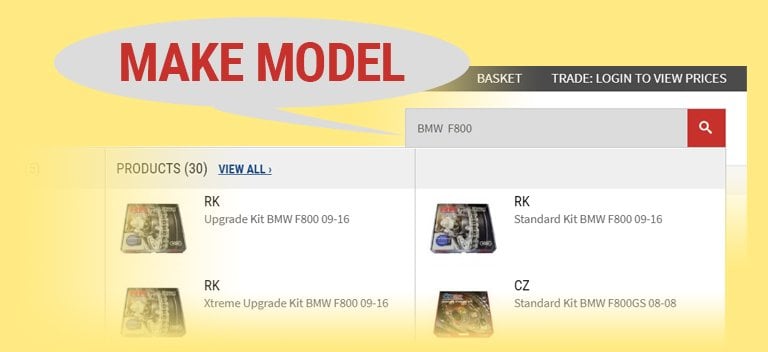
Basic vehicle fitments are added to our general website search, and even have some dedicated products to specific vehicles like with our Chain & Sprocket Kits.
You can use the websites search by to find all these parts usually by only using Manufacturer and Model in your search.